Most businesses are not AI-ready - how to tell
Short answer: most Australian small businesses are using AI but are not AI-ready. Being AI-ready means the data, the processes and the people underneath the tool can carry the weight once the demo is over. You can check it in about ten minutes: look for the ten warning signs below, or take our free twelve-question AI-Readiness Data Check.
Nearly every business owner has tried an AI tool by now. Far fewer are actually AI-ready. That gap is not about ambition. Most owners want this to work. It is about foundations, and it is checkable in about ten minutes if you know what to look for.
MYOB’s 2026 Business Monitor found that Australian small businesses already using AI are growing 2.8 times faster than those that are not - but 46% of SMEs still have no plan to adopt it at all, and 85% have no formal policy on how it should be used day to day. The OECD’s December 2025 review of SME AI adoption found a similar pattern globally: use is climbing fast, but maturity is lagging well behind enthusiasm. Adoption and readiness are two different things, and the second one is the part nobody sells you.
Is it true that Australian small businesses are still not ready for AI in 2026?
Yes. Treasury’s 2026 Intergenerational Report, released in September, puts the same gap in national terms. Two-thirds of Australian businesses now report using AI in some form, yet fewer than one in ten describe that use as significant, and Treasury links the modest productivity gains recorded so far to low trust in the technology among staff, customers and business owners alike.
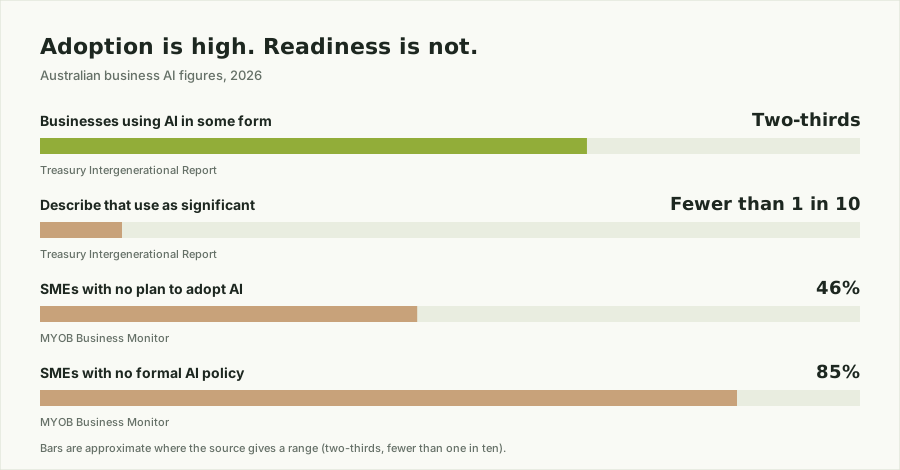
The report expects AI to shape the economy for the next 40 years, and it names businesses - not government - as the primary implementers, responsible for training, redesigning jobs and putting workplace protections in place. It also makes a point small business owners should sit with: most jobs mix tasks AI can take on with tasks that depend on human judgement, and how easily those two can be separated will decide how quickly AI is adopted at all.
For a business with ten staff, that is the whole readiness question in one line. The technology is available to everyone. What separates the one in ten from the rest is whether the data, the processes and the people underneath it are set up to carry it.
| Measure | Figure | Source |
|---|---|---|
| Australian businesses using AI in some form | Two-thirds | Treasury, 2026 Intergenerational Report |
| Businesses calling their AI use significant | Fewer than 1 in 10 | Treasury, 2026 Intergenerational Report |
| Growth rate of small businesses using AI vs not | 2.8 times faster | MYOB 2026 Business Monitor |
| SMEs with no plan to adopt AI | 46% | MYOB 2026 Business Monitor |
| SMEs with no formal AI policy | 85% | MYOB 2026 Business Monitor |
What are the 10 signs your business is not AI-ready yet?
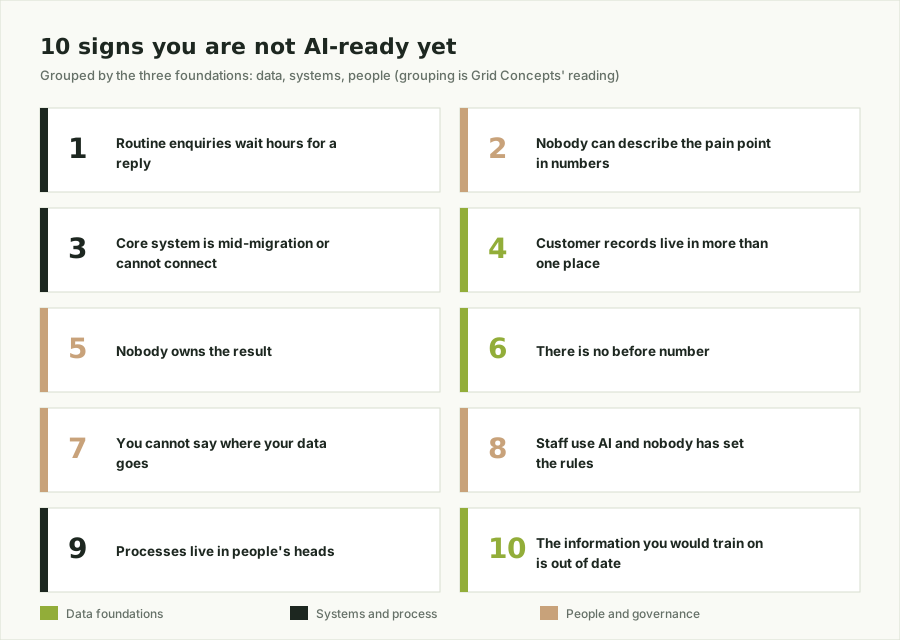
- Routine enquiries wait hours for a reply. A quote request, a booking confirmation or a “where is my order” email sitting untouched until someone clears the inbox is a workflow problem, not a staffing problem. A plumbing business where “can you come Thursday?” texts pile up until the owner is off the tools at 6 pm is the classic case.
- Nobody can describe the pain point in numbers. “Admin is killing us” is a feeling. “We spend about eight hours a week retyping job details from email into the scheduling tool, and roughly one in twenty ends up with the wrong address” is a brief. If nobody in the business can produce the second version, an AI project has nothing to aim at yet.
- Your core system is mid-migration or cannot be connected to anything. AI works by plugging into what you already run. If the CRM is being replaced next quarter, or the job system is a 2009 desktop program whose only export is “print”, the foundation needs fixing before any tool goes on top of it.
- Customer records live in more than one place. Job history in one system, quotes in an inbox, mobile numbers in a spreadsheet someone keeps by hand. Picture a cafe group with loyalty members in the POS, catering clients in Gmail and function bookings in a diary: ask which customers spent the most last year and nobody can answer without a weekend of copy-paste. A tool cannot reconcile that for you; a person has to first.
- Nobody owns the result. “Looking at AI” has been an agenda item at the Thursday meeting for six months and nobody’s name is next to it. Every project we have seen work had one accountable person and a deadline; every one that faded had a working group. If you cannot say who would wear it if the pilot flopped, nobody is running it.
- There is no “before” number. If you cannot say what last month’s average reply time, quote-to-win rate or hours of admin looked like, you will never prove the tool changed anything. A dental practice that installs an AI receptionist without first counting missed calls will only ever have “the front desk seems calmer” to show for it.
- You cannot say where your data goes. Which AI tools have seen your customer records, where that text is stored, and whether the arrangement holds up under the Privacy Act. If the answer needs a phone call to whoever set the tool up, the answer is no. This is the sign that turns into a real problem rather than a wasted subscription.
- Staff are already using AI, and nobody has set the rules. In the MYOB figures above, 85% of SMEs have no formal policy, which in practice means the junior is pasting customer emails into a free chatbot and the owner does not know. Five minutes of training and a one-page do-and-don’t list fixes it; the absence of both is a readiness gap, not a people problem.
- Your processes live in people’s heads. There is no written version of how a quote is built, how a job gets scheduled or what happens when a customer complains. AI automates a documented process; it cannot automate “ask Dave”. A bookkeeping firm where only one senior person knows the month-end steps cannot hand any of them to a tool until they are written down.
- The information you would train a tool on is out of date. The website still shows 2023 prices, the FAQ describes a service you dropped, and the product list has variants you no longer sell. Point a chatbot at that and it will confidently tell customers the wrong thing. Fix the source before you automate the answers.
What this looks like in our client conversations
- A real estate agent. “Everything’s in the CRM,” the agency principal told us. Ten minutes in, we were looking at buyer enquiries spread across three inboxes and a “hot buyers” spreadsheet the receptionist updates on Fridays. When we asked how many enquiries became inspections last month, the answer was “I’d have to ask the office”. There was no baseline, so nothing for an AI follow-up tool to beat.
- A property lawyer. “We’re careful with client data, so we don’t use AI,” the partner said. Then a junior mentioned she pastes contract clauses into a free summariser to save time. Nobody could say where that text ends up or how it squares with the Privacy Act and confidentiality obligations. Two signs in one conversation.
- An industrial vacuum cleaner salesperson. “I just need something that writes my quotes faster.” Leads were coming from trade shows, the website and a distributor, each landing somewhere different, and the price list lived in his head. There was no clean product data and no CRM owner for a quoting assistant to plug into, so the first job was a product sheet, not an AI tool.
What does AI-ready actually look like?
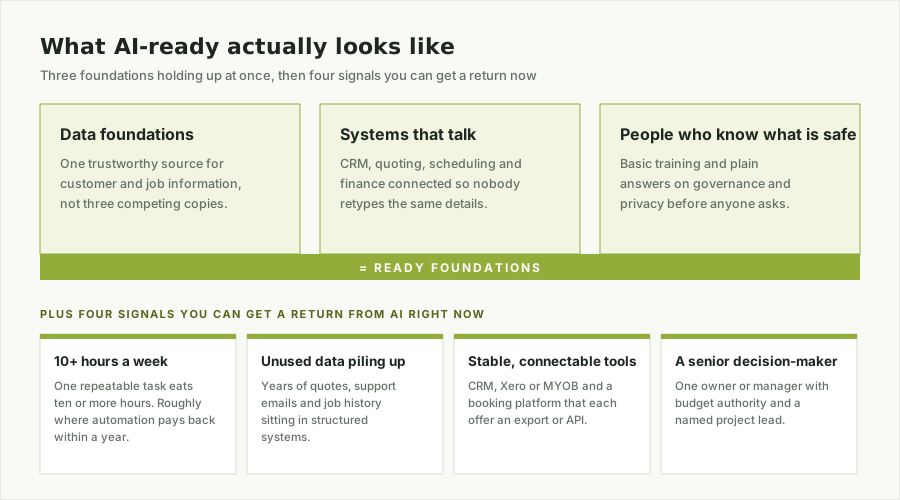
It is not a data warehouse or a twelve-month project. It comes down to three things holding up at once:
- Data foundations - one trustworthy source for the customer and job information you use every day, not three competing copies.
- Systems that talk to each other - enough connection between your CRM, quoting, scheduling, and finance tools that nobody is retyping the same details three times.
- People who know what “safe to use” means - basic training and a plain answer to the governance and privacy questions before anyone asks them.
Alongside those three foundations, there are practical signals that a business is ready to get a return from AI right now:
- One repeatable task eats ten or more hours a week. That is roughly the point where automation pays for itself within a year. The task is usually mundane and lives inside one system: a retailer emailing sales and stock updates to each regional office every Monday morning, or a real estate agent spending Friday afternoons sorting settlement data in Excel to see which suburbs recorded the most home purchases that month. Both are AI jobs today.
- Data is piling up that nobody looks at. Five years of quotes in the accounting system, every support email since 2020, the full job history in the scheduling tool. If it sits in a structured system, it is an asset waiting to be connected, not a problem. A trades business that has never asked its own job data which service types are actually profitable is a good example.
- Your core tools are stable and can be connected. A CRM, Xero or MYOB, and a job or booking platform that each offer an export or an API is enough. Think of a clinic running a booking system, an accounting package and a mailing list that have never been linked, so every new patient is typed in twice. The systems are fine; the connection is missing.
- Someone senior can make the call. One owner or manager with budget authority and a named project lead. If the decision has to go through a committee, the project will stall before it starts.
We wrote more on what that gap looks like across Victorian SMEs specifically in The State of AI for Victorian SMEs.
What are real examples of businesses using AI successfully?
Readiness is easier to picture with real examples. Here are three from our own client work at Grid Concepts. None of them started with an AI strategy; each started with one small, well-defined task.
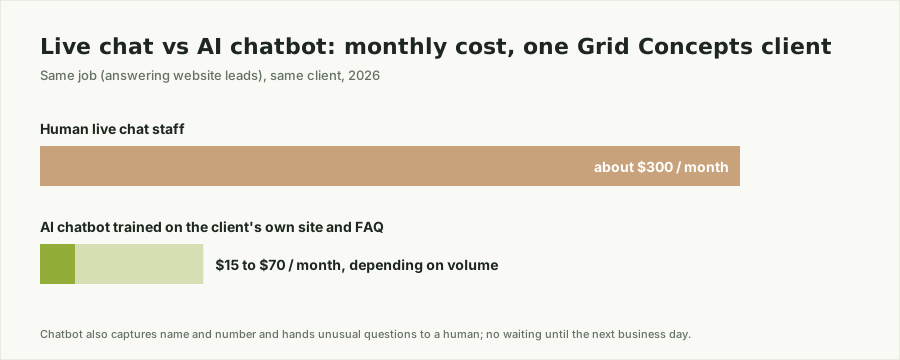
Live chat replaced by an AI chatbot. In 2026, one of our clients was paying around $300 a month for human staff to answer website leads through live chat. When we pulled the chat logs, the conversations were strikingly repetitive: opening hours, service areas, rough pricing, “can someone call me back”. The same twenty questions, asked in slightly different words, hundreds of times. We built an AI chatbot trained on the client’s own site content and FAQ, set it to capture the visitor’s name and number and hand anything unusual to a human, and switched the live chat off. The bot does the same job for between $15 and $70 a month depending on volume, and nobody waits until the next business day for an answer.
YouTube transcripts, from manual job to AI default. Until 2022, a long-standing client regularly asked us to add speech transcripts to his YouTube videos. It was a manual task: listen, type, check names and figures, format, upload. Around three to five years ago AI transcription started taking that work over, and today it is simply the default. The transcript is generated automatically in minutes, one of our team proofreads it for names and industry terms, and the same text feeds the captions, the video description and a blog post for search. The client still gets his transcripts; what disappeared was the hours of typing.
Paid ads with the client’s face, without the client on camera. A client wanted his own face fronting his paid ads. Personal presence converts well in his market, but he never had a free hour to sit down and record. Using AI video tools, we produced short video creatives from the client’s existing photos, working from a script he approved, and ran them in his paid campaigns. Conversion rates on the campaign improved, and the client’s involvement dropped to signing off a script and a preview.
What the three have in common is exactly what the ten signs above test for: one repetitive task, one person who owned it, and a number to compare against afterwards.
How do I know if my business is ready for AI? Take the AI-readiness test
Guessing at this is slower than just checking it. Our complimentary AI-Readiness Data Check is twelve questions covering exactly the ten signs above, and it takes about ten minutes. No setup, no sales call to get the result - just a plain picture of where your foundations stand before you spend on anything.
Most owners land on this page after searching something like “how do I know if my business is ready for AI” or “take a test to see if my business is ready for AI implementation”. Both questions have the same short answer: stop guessing and take the test. Twelve questions, ten minutes, and you walk away knowing which of the ten signs applies to you and which one to fix first.
How do I know which AI my business needs?
The tools have settled into clear categories. Right now there are mature AI solutions for:
| Category | What it does |
|---|---|
| Text and correspondence | Emails, quotes, follow-ups and chat replies |
| Document and PDF processing | Reading, summarising and extracting data from contracts, invoices and forms |
| Data analysis and spreadsheets | Cleaning, sorting and reporting on the numbers you already have |
| Presentation creation | Decks, proposals and pitch material |
| Meetings and calls | Transcripts, summaries and action items |
| Programming and coding | Scripts, integrations and internal tools |
| Visuals and design | Images, video and ad creatives |
| Task planning | Scheduling, prioritising and keeping projects on track |
The list is specific, yet in practice nine out of ten business owners we speak to still cannot say which of their own tasks AI could take off their plate. That is not a gap you need to close on your own. If you would like a clearer picture of which of your processes could run cheaper and faster with AI, book a meeting with us. The consultation is free and comes with no obligation.
Frequently asked questions
What does AI-ready mean for a small business?
It means the data, the processes and the people underneath an AI tool can carry the weight once the demo is over: one trustworthy source for customer and job information, systems that connect, and staff who know what is safe to use.
How long does it take to check if my business is AI-ready?
About ten minutes. Our free AI-Readiness Data Check is twelve questions and shows which of the ten warning signs applies to you and which to fix first.
Do I need a big data project before I can use AI?
No. AI-ready is not a data warehouse or a twelve-month project. A single repeatable task that eats ten or more hours a week, stable tools that can be connected, and one senior owner is often enough to start.
How much can AI save a small business?
It depends on the task. In one Grid Concepts client case, an AI chatbot replaced live chat that cost around $300 a month and now costs between $15 and $70 a month depending on volume.
Who should own an AI project in a small business?
One named, accountable person with a deadline. Every project we have seen work had one; every one that faded had a working group.