Chasing unpaid invoices: can AI actually speed up follow-ups?
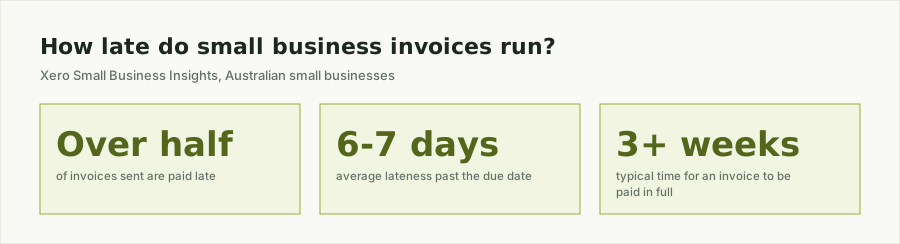
You did the job, sent the invoice, and now you are the one chasing someone else’s money to pay your own bills and wages. Xero’s Small Business Insights data shows just over half of the invoices Australian small businesses send are paid late, arriving an average of six to seven days past the due date, with the typical invoice taking over three weeks to be paid in full. So “can AI actually speed up chasing unpaid invoices” is a fair question, and it deserves a straight answer rather than a sales pitch: yes, for the repetitive part. No, not for the part that actually gets a stuck invoice paid.
The two different jobs hiding inside “chasing invoices”
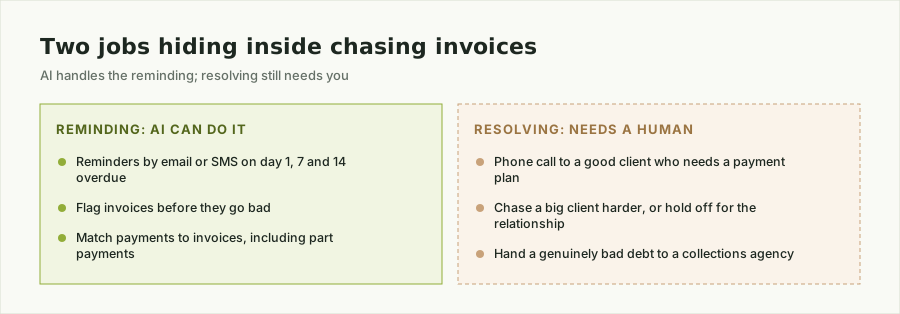
Most owners lump “chasing unpaid invoices” into one dreaded task. It is really two:
Reminding. Sending the first nudge a day after the due date, a firmer one a week later, and a clear “this is now overdue” message after that - on a schedule, in a consistent tone, without you remembering to do it between jobs. This is the part that eats your evenings for no good reason, because none of it requires judgement. It just requires that someone actually does it, every time, on time.
Resolving. The phone call to a good client who is short this month and needs a payment plan. The judgement call on whether to chase a big client harder or hold off because you need the relationship. The decision to hand a genuinely bad debt to a collections agency. This part needs you, or someone who knows the client, because it involves a relationship and a business decision that a tool cannot make on your behalf.
Where AI actually helps with unpaid invoices
Automating the reminding half is the realistic win, and it is more useful than it sounds:
- Scheduled follow-ups that actually go out. A reminder drafted from your invoice and due date, sent by email or SMS on day one, day seven, and day fourteen overdue, without it depending on you remembering between quotes and jobs.
- Flagging invoices before they go bad. Instead of noticing a client is three invoices behind when you finally sit down with the books, you see it the week it starts, while a conversation is still easy.
- Matching payments to invoices. When a client pays part of an amount, or pays against the wrong reference, that gets reconciled automatically instead of sitting in your account waiting for you to work out what it was for.
None of that replaces the phone call that actually gets a difficult invoice paid. It just means you are only making that call for the invoices that genuinely need it, instead of every overdue invoice on the list.
Why this goes wrong without the data behind it
Automated reminders only work if the underlying invoice data is trustworthy. If your invoicing software, your job records, and your client contact details live in three different places, an automated reminder either goes to an old email address, chases an invoice that was already paid in cash, or misses one entirely because it was never entered properly in the first place. That is not an AI problem - it is the same data mess that undermines quoting and scheduling automation, covered in more detail in Fix the data first - then AI works. Chasing unpaid invoices with AI is only as reliable as the invoice list it is working from.
Where to actually start
Before you buy anything to chase unpaid invoices, check one thing: how much of your invoice, payment, and client contact information already sits in your accounting software in a clean, current state, and how much lives in someone’s memory or a separate spreadsheet. If the answer is “mostly clean,” a scheduled reminder tool is a quick, low-cost first step. If it is not, fixing that gap comes first, or you are just automating the chasing of information that is already wrong.
Our complimentary AI-Readiness Data Check takes about ten minutes and tells you exactly which of those two situations you are in, before you spend on a tool that only works if your data already does.